Introduction: Your Google Ads Account Probably Has a Leak
Most small business Google Ads accounts share a common problem: they spend money, they generate some activity, and they produce results that feel… fine. Not great, not terrible — just fine. The clicks are there. The impressions look healthy. But the leads never seem proportional to what’s being spent.
That gap between spend and results isn’t random. It’s almost always traceable to a handful of structural issues that are remarkably consistent across accounts. After managing Google Ads campaigns across dozens of industries and budgets, the patterns become predictable: the same mistakes, the same wasted dollars, the same missed opportunities.
This post covers exactly where small business Google Ads accounts lose money — and what to do about it. No theoretical best practices. Just the things that actually move the needle.
Mistake 1: Running Broad Match Without Proper Negatives
Broad match keywords are powerful — but only when paired with an aggressive negative keyword strategy. Without it, you’re essentially telling Google to show your ad for anything it considers vaguely relevant to your keyword. That ‘vague relevance’ can drift badly.
A roofing company bidding on ‘roof repair’ in broad match might end up paying for clicks from people searching ‘DIY roof repair YouTube’ or ‘how to repair a roof shingle yourself.’ Neither of those searchers is your customer. Both of them just cost you money.
The fix: audit your Search Terms report weekly in the early stages of a campaign and build out a negative keyword list aggressively. Add negatives at the campaign and account level. Revisit every 30 days minimum.
Mistake 2: Not Using Conversion Tracking Correctly
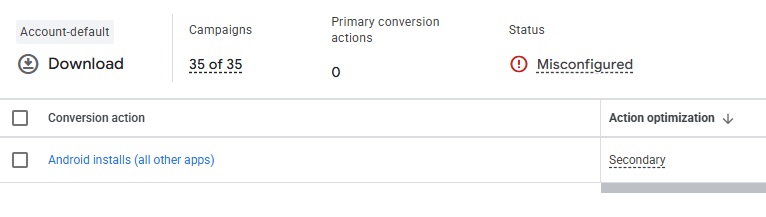
This one sounds basic, but it’s alarmingly common: accounts spending thousands of dollars per month with conversion tracking that’s broken, duplicated, or tracking the wrong events.
If you’re optimizing toward ‘website visits’ or ‘button clicks’ rather than actual lead submissions, phone calls, or purchases, you’re teaching Google’s algorithm to find more of the wrong thing. Smart Bidding is only as smart as the signal you give it. Bad signals produce bad results — and more spend.
Audit your conversion actions. Confirm they’re firing on real conversion events. If you’re running a lead gen campaign, a phone call from a qualified prospect and a form submission are conversions. A page visit is not.
Mistake 3: Ignoring the Quality Score and Landing Page Alignment
Low Quality Scores cost real money. When your ad and landing page are misaligned with the search query — either in messaging, relevance, or user experience — Google charges you more per click and ranks your ads lower. The result is paying a premium to reach fewer people less effectively.
The fix isn’t complicated, but it requires discipline: match your ad copy tightly to the keyword, and make sure your landing page delivers on the promise of the ad. If your ad says ‘Emergency Plumber Available 24/7,’ the landing page better lead with that message and make it trivially easy to call.
Mistake 4: Running Campaigns Without Dayparting, Geographic, or Device Bid Adjustments
Default campaign settings in Google Ads were designed to get you spending broadly — not efficiently. Without bid adjustments, you’re paying the same for a click from a mobile user 40 miles away as you are for a desktop user in your core service area.
Pull your performance data by device and by geography. You will almost certainly find that certain device types (often mobile) convert at significantly lower rates while eating a disproportionate share of budget. Adjust bids accordingly. For location-based businesses, tighten geographic targeting and apply bid boosts to high-converting zip codes.
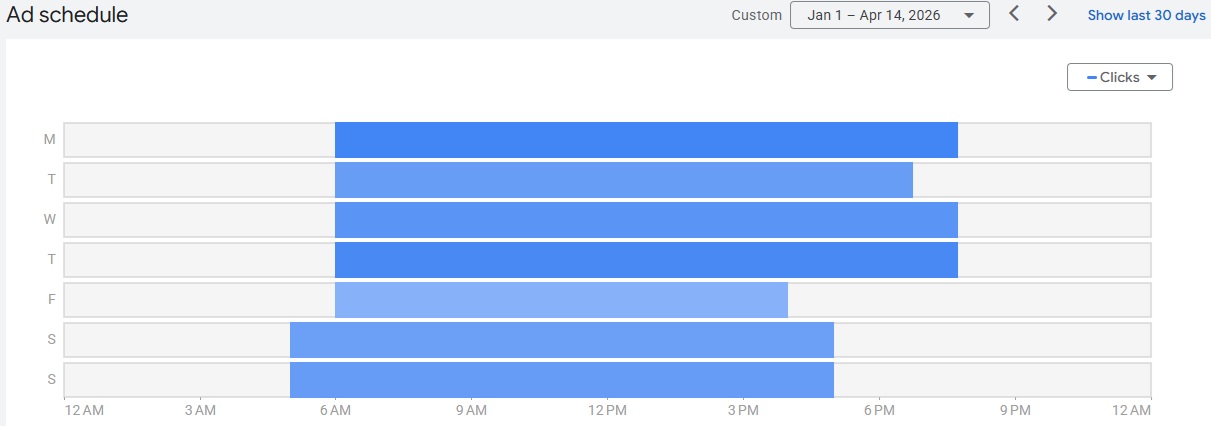
Day parting in Google Ads (officially called “Ad Scheduling”) lets you control exactly when your ads show — by hour and day of the week — either by completely restricting ad delivery to specific windows or by applying bid adjustments that increase or decrease how aggressively you compete during certain hours.
To use it, navigate to a campaign, go to Ad Schedule under Settings, and add the specific days and time blocks you want to target. Once you have some conversion data in the account, the real power kicks in: pull a report segmented by “Hour of Day” and “Day of Week” to identify when your clicks are actually converting versus when you’re just spending.
A home services company might find that calls spike between 7–9am and 4–7pm on weekdays — that’s where you apply a +25–40% bid adjustment. Conversely, if Saturday midnight is burning budget with zero conversions, you either zero out bids or exclude the window entirely.
For campaigns on Smart Bidding strategies like Target CPA or Target ROAS, manual bid adjustments are largely ignored — Google’s algorithm handles time-of-day optimization automatically using your conversion data, so day parting in that context is better used as a blunt exclusion tool (cutting hours that are genuinely worthless) rather than fine-tuned bid modulation.
The bottom line: day parting without conversion data is guesswork — run campaigns long enough to accumulate meaningful hourly signal before making aggressive schedule changes.
Mistake 5: Letting Google Manage Everything on ‘Maximize Clicks’
‘Maximize Clicks’ is Google’s default bidding strategy and also one of the worst choices for most lead-generation campaigns. It does exactly what it says — maximizes the number of clicks within your budget — with no regard for whether those clicks will ever become customers.
For most small business accounts, Target CPA (cost per acquisition) or Target ROAS bidding will dramatically outperform Maximize Clicks once you have enough conversion data to feed the algorithm. The threshold is generally 30–50 conversions per month in a campaign. Below that, manual CPC with thoughtful bid management often outperforms automated strategies.
The Audit You Should Run Right Now
If you want a quick diagnostic on your account’s health, pull these five reports today:
-
- Search Terms Report — 90 days. Look for irrelevant queries eating budget.
-
- Conversion Action Report — Confirm all conversions are firing and represent real business outcomes.
-
- Device Performance Report — Check conversion rates and CPA by device type.
-
- Geographic Report — Identify which locations are converting and which are just spending.
-
- Campaign Bidding Strategy — Confirm you’re on an appropriate strategy for your conversion volume.
Most accounts that haven’t been actively optimized in 90+ days will show meaningful opportunities in all five of these areas.
Conclusion: Google Ads Rewards the Detail-Oriented
Google Ads is not a set-it-and-forget-it channel. It rewards businesses (and their agencies) that stay close to the data, react quickly to performance signals, and optimize relentlessly. The accounts that waste budget are almost always the ones that were set up once and never touched.
If your Google Ads account feels like a money pit, it’s probably not the platform — it’s the structure and management. The right account architecture, combined with disciplined optimization, can dramatically improve your cost per lead without increasing spend.
Lionwish offers a free paid search audit for businesses that want an honest assessment of where their budget is going — and where it should be going instead. No obligation. Just clarity.
Frequently Asked Questions
Why is my Google Ads budget being spent so quickly?
Rapid budget depletion is usually caused by broad match keywords without negatives, overly wide geographic targeting, or a bidding strategy optimized for volume rather than conversions. An account audit will identify which factors are at play.
What is a good cost per lead for Google Ads?
It depends heavily on your industry and location. A realistic CPL benchmark for local service businesses ranges from $30–$150+, with legal, medical, and financial services typically at the higher end. What matters more than the benchmark is whether your CPL is profitable relative to your average customer value.
How often should I check my Google Ads campaigns?
Active campaigns should be reviewed at minimum weekly. Search terms reports, conversion data, and budget pacing should be checked more frequently in the first 30 days of a new campaign or after significant changes.
Is Google’s automated bidding good for small businesses?
Automated bidding can work well for small businesses — but it requires sufficient conversion data to function accurately. Campaigns with fewer than 30 conversions per month often perform better on manual CPC or enhanced CPC until conversion volume increases.
What’s the difference between clicks and conversions in Google Ads?
Clicks measure how many times your ad was clicked. Conversions measure how many of those clicks resulted in a desired action — like a form submission, phone call, or purchase. Optimizing for conversions rather than clicks is almost always the right approach for lead generation campaigns.