Someone in your market just asked ChatGPT for a recommendation. Maybe it was “best HVAC company in Palm Desert” or “which marketing firm should I hire for a medical practice.” The AI gave them three names. Was yours one of them?
Most business owners have no idea. There is no Search Console for ChatGPT, no rank report that shows where you landed in a Gemini answer, and AI responses change from one conversation to the next. That does not mean you are flying blind. Here is how to find out whether AI recommends your business, how to keep tracking it, and what to do if the answer is no.
The Short Answer
Ask the AI tools the same questions your customers ask, check your analytics for AI referral traffic, and ask new leads how they found you. Do all three on a regular schedule. One test tells you almost nothing because AI answers vary. A pattern across dozens of prompts over a few months tells you a lot.
Step 1: Ask the AI Tools Directly
Start with the platforms people use to research purchases: ChatGPT, Google Gemini, Google AI Overviews and AI Mode, Perplexity, Microsoft Copilot, and Claude. Each one pulls from different sources and weighs them differently, so showing up in one says little about the others.
Use the Prompts Your Customers Would Use
Do not search your own business name. Of course AI knows who you are when you hand it your name. The real question is whether it brings you up when someone has a problem you solve. Write 10 to 20 prompts across these types:
- Category prompts: “Best [service] in [city]” or “Top [service] companies for [industry]”
- Problem prompts: “Who can help me fix [specific problem]?”
- Comparison prompts: “[Your business] vs [competitor]” or “Alternatives to [competitor]”
- Qualifier prompts: “Affordable [service] near [neighborhood]” or “[Service] that specializes in [niche]”
- Direct prompts: “What do you know about [your business]?” This one checks accuracy, not visibility.
Test Clean
- Use a logged-out or private window where you can. Logged-in accounts carry memory and history that skew results.
- Run each prompt more than once. AI answers are not fixed. A business that appears two out of five times is in a very different spot than one that appears five out of five.
- Match your customers’ location for local searches. “Near me” means nothing if you are testing from another city.
- Log every result in a spreadsheet: date, platform, prompt, whether you were mentioned, your position in the list, which competitors showed up, and which sources the AI cited.
That last column matters more than most people think. When Perplexity, Google AI Mode, or ChatGPT search cite sources, they show you which pages shaped the answer. If a competitor keeps getting recommended and the cited source is a “best of” list you are not on, you now know what to go fix.
Step 2: Check What AI Says About You
Visibility is half of it. Accuracy is the other half. Ask each platform to describe your business, your services, your service area, your hours, and your pricing. AI tools sometimes pull outdated details from old directory listings, a former address, or a service you stopped offering years ago. A wrong answer delivered with confidence to a ready-to-buy prospect is worse than no answer at all.
If you find errors, trace them back. Inconsistent business information across your Google Business Profile, Yelp, industry directories, and your own website is one of the most common causes.
Step 3: Look for AI Referral Traffic in GA4
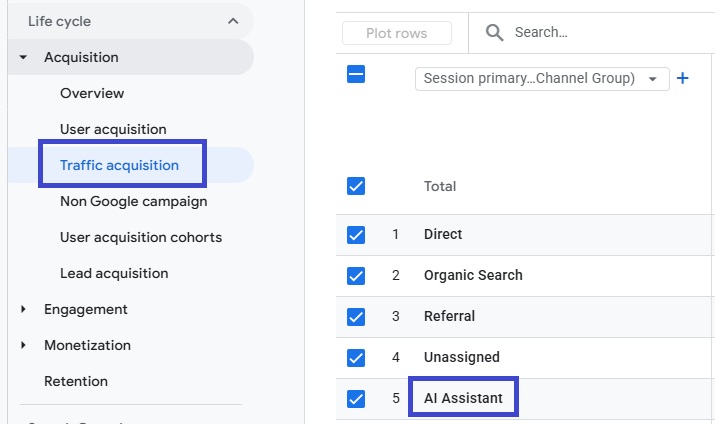
When an AI platform links to your site and someone clicks, that visit usually shows up in Google Analytics 4 as referral traffic. Go to Reports, then Acquisition, then Traffic acquisition, and set the dimension to Session source. Look for sources like these:
- com
- ai
- google.com
- microsoft.com
- ai
For an ongoing view, build a custom channel group in GA4 with a rule that catches these sources and labels them “AI Assistants.” That keeps AI traffic from getting buried with every other referral.
Two caveats. First, clicks from Google AI Overviews and AI Mode are counted as regular Google organic traffic, so you cannot pull them out separately in GA4. Second, many AI recommendations never produce a click. Someone reads the recommendation, then searches your name on Google or picks up the phone. That shows up as branded search or direct traffic, not AI referral traffic. Watch for rising branded search impressions in Google Search Console as a secondary signal.
Step 4: Ask Your Leads
The lowest-tech method is often the most reliable. Add “How did you hear about us?” to your contact form and include an option like “ChatGPT or another AI assistant.” Have whoever answers the phone ask the same question. Once the option is there, people use it, and it captures the recommendations that never show up in your analytics.
Step 5: Use an AI Visibility Tracking Tool
Manual testing works, but it does not scale. Several SEO platforms now offer AI visibility tracking, including the Semrush AI toolkit and Ahrefs Brand Radar, along with a growing list of standalone tools. They run large sets of prompts across AI platforms on a schedule and report how often your brand is mentioned, how you compare to competitors, and which sources get cited.
Treat these tools as trend lines, not scorecards. Their prompt sets are samples, and AI answers shift constantly. Use them to spot direction. Are you showing up more this quarter than last? Is a competitor pulling ahead? Which sources keep getting cited in your category?
Why AI Might Not Be Recommending Your Business
If testing shows you are missing, the cause usually falls into one of these buckets:
- Your site blocks AI crawlers. Check your robots.txt file for rules that block GPTBot, OAI-SearchBot, PerplexityBot, ClaudeBot, or Google-Extended. Some security plugins and CDN settings block them by default without anyone noticing.
- Your content does not answer real questions. AI pulls from pages that answer a specific question clearly. A services page that says “we deliver results” gives it nothing to work with.
- Nobody else is talking about you. AI weighs third-party mentions heavily: reviews, directory listings, industry publications, local news, “best of” roundups, and Reddit threads. If your own website is the only place that describes your business, you are hard to recommend.
- Your business information is inconsistent. Different names, addresses, phone numbers, or service descriptions across the web make it harder for AI to connect the dots and trust what it finds.
- Your reviews are thin. For local recommendations especially, review volume, recency, and rating carry real weight.
- Key content is hidden behind JavaScript. Some AI crawlers do not render JavaScript well. If your services, pricing, or location details only load after scripts run, they may never get seen.
What to Do If AI Is Not Recommending You
Improving AI visibility looks a lot like good SEO, with a few different priorities:
- Fix technical access first. Make sure AI crawlers can reach and read your site.
- Clean up your business information everywhere it appears, starting with your Google Business Profile.
- Build pages that answer the specific questions your buyers ask, in plain language, with the answer near the top of the page.
- Add structured data (schema markup) for your organization, services, locations, reviews, and FAQs.
- Earn mentions on the third-party sites AI keeps citing in your category. Your prompt-tracking spreadsheet will tell you which ones those are.
- Keep collecting reviews, steadily rather than in bursts.
- Re-test every month and track the trend.
None of this happens overnight. Expect movement over a few months, not a few days, and expect it to vary by platform.
A Simple Monthly Tracking Routine
Task | How Often | Time |
Run your core prompt set across 4 to 6 AI platforms | Monthly | 1 to 2 hours |
Log mentions, position, competitors, and cited sources | Monthly | Included above |
Review AI referral traffic in GA4 | Monthly | 15 minutes |
Check branded search trends in Search Console | Monthly | 15 minutes |
Review “How did you hear about us?” responses | Monthly | 15 minutes |
Check what AI says about your business for accuracy | Quarterly | 30 minutes |
Check robots.txt for AI crawler access | Quarterly and after site changes | 10 minutes |
Frequently Asked Questions
Can I check if ChatGPT recommends my business for free?
Yes. Open ChatGPT in a private window, run the prompts your customers would use, and log the results. It takes time but costs nothing. Paid tools add scale and automation.
Why do AI assistants recommend my competitors instead of me?
Usually because those competitors have more third-party mentions, more reviews, clearer content, or more consistent business information. Look at the sources the AI cites when it recommends them. That list is your roadmap.
Does ranking on Google mean AI will recommend me?
It helps, especially for Google AI Overviews and AI Mode, which draw heavily from pages that already rank. It guarantees nothing on ChatGPT, Perplexity, or other platforms, which use different sources and signals.
How often do AI recommendations change?
Constantly. The same prompt can produce a different answer an hour later. That is why a single test means very little and a tracked pattern over time is what counts.
Can I pay to get recommended by AI?
Some AI platforms now run ads, but those are labeled separately from the answer itself. There is no way to buy a spot in the organic recommendation. You earn it.
Find Out Where You Stand
If you want a clear answer without spending a weekend running prompts, Lionwish offers AI search visibility audits. We test your business across the major AI platforms, show you where competitors are getting recommended instead of you, and lay out what to fix first. You work directly with a senior strategist from start to finish, not an account manager.